Updaten naar nieuwere versies
Video-handleiding
Bekijk de bovenstaande video-handleiding voor een uitleg van het updateproces. Het kan helpen om full-screen in te schakelen!
Instructies
-
Als je
Start Server.cmduitvoert, krijg je mogelijk een melding dat Peacock verouderd is, zoals te zien is in deze voorbeeldafbeelding: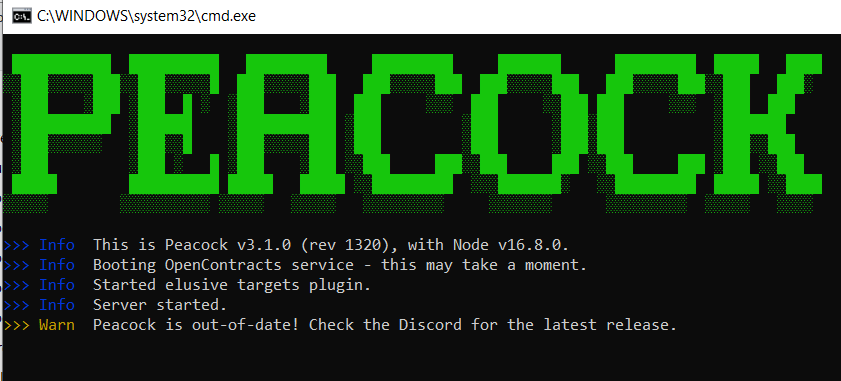 .
. -
Normaal gesproken hoef je Peacock alleen te updaten als er een nieuwe game-update is, maar blijf voor de zekerheid op de hoogte in de Peacock Discord kanalen
#updatesen#downloads.- Opmerking: Peacock kan tijdelijk niet beschikbaar zijn na een game-update, omdat het een paar uur duurt voordat de Peacock Patcher ook is bijgewerkt.
-
Als er een nieuwe Peacock update is, ga dan naar de laatste Peacock release op GitHub om de laatste build te downloaden.
-
Pak de bestanden uit. Het uitvoeren van de bestanden vanuit de gezipte map werkt niet.
-
Aannemend dat je Peacock hebt gebruikt tijdens de vorige game-update, volg de onderstaande instructies om je loadouts en in-game savebestanden te behouden (Anders worden al je loadouts standaard teruggezet naar ICA19/munten/fiberwire en gaan je in-game savebestanden verloren).
- Kopieer je oude
userdataencontractSessionsmappen van je vorige Peacock installatiemap en plak deze in je nieuwe Peacock installatiemap. Vervang indien nodig bestaande bestanden in de map van de nieuwe Peacock build. - Bekijk deze voorbeeldafbeelding als je problemen hebt met het vinden van de mappen
userdataencontractSessions: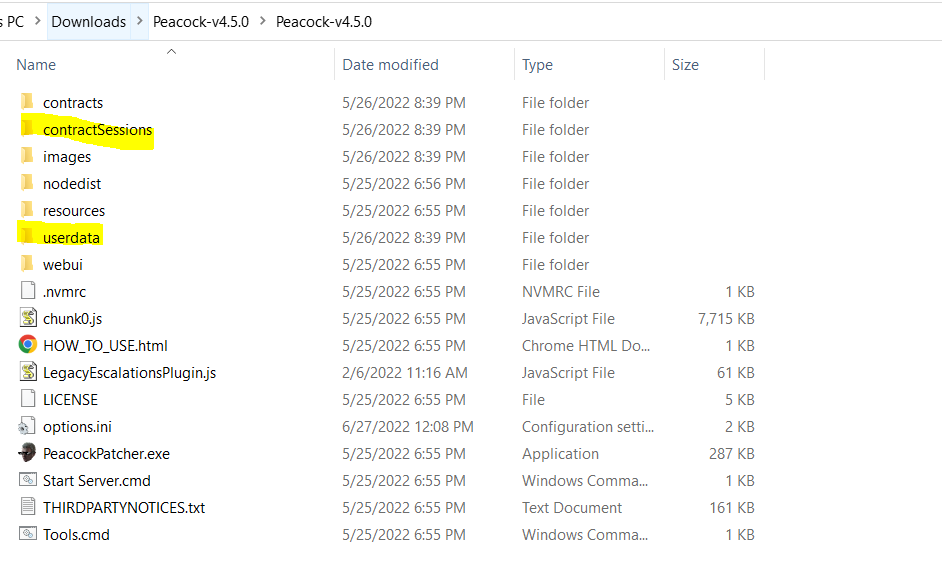
- Kopieer je oude