Custom Content
Peacock has lots of goodies packed in for our users. Here's a peek at our custom content!
Escalations
Custom Peacock Escalations
Peacock supports custom (Peacock original) escalations. These escalations are available in-game by default. You can see some custom escalations listed in the Roadmaps as well.
Official Server Escalations and Legacy Escalations
Peacock also supports all official server escalations, including Hitman 2016 escalations that have not been ported to Hitman 2 or 3 (legacy escalations). These escalations are available in-game by default.
- Note: You can select specific escalation levels to start on using the Escalation Level Picker tool, as explained here
Contracts Mode
Peacock supports both official server and custom Peacock contracts.
Featured contracts
This includes custom (Peacock original) contracts created by Peacock dev team. You can see some of these custom featured contracts here.
- Note: Official Servers Featured Contracts are not included.
How to Play
Go to Game Modes -> Contracts -> Featured menu in-game.
User-Created Official Server Contracts
How to Install
- Note: This only works while the HITMAPS bot is authenticated for the platform in
question.
- More info on how to authenticate it.
- To check if it's online, run the command
/botstatusin the#bot-spamchannel in the Peacock Discord. The status is updated every 10 minutes.
- Go to
Game Modes->Contracts->Contract Lookupmenu in-game. - Enter the official server contract ID (Contracts from every platform except Nintendo Switch are supported for this).
- The contract will now be downloaded in your
contractsfolder.
How to Play
Go to Game Modes -> Contracts -> My Contracts in-game to play.
User-Created Peacock Contracts
How to Install
Download the contract's .json file from the share-contracts channel in Peacock Discord. Place the .json file
in your Contracts folder, as shown here: 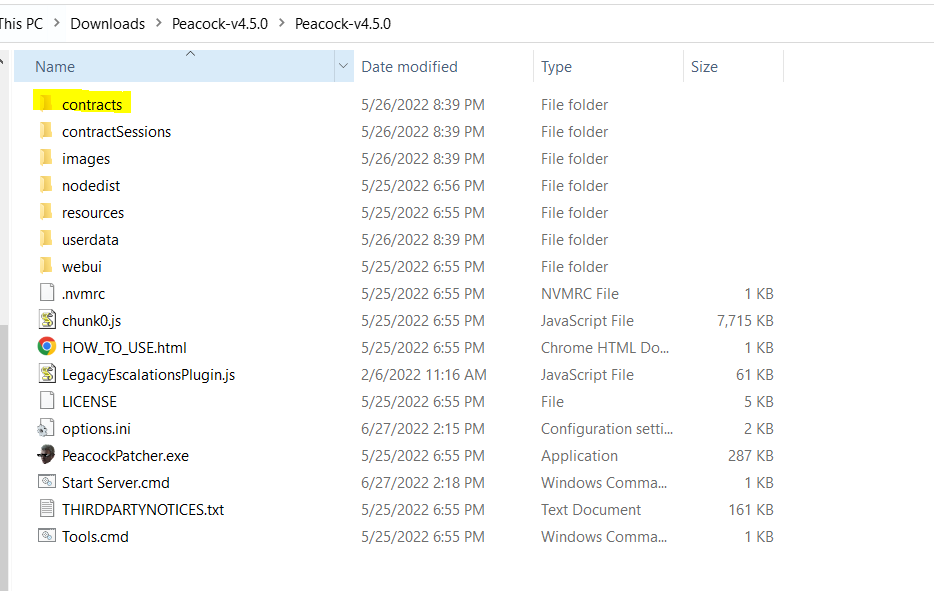 .
.
How to create your own
- If you create a contract in-game while in Peacock server, your contract will be saved as an
.jsonfile inContractsfolder, as shown in the image above. - Be sure to share your
.jsonfile in Peacock Discord'sshare-contractschannel if you want others to play your custom Peacock contract.
How to Play
- Go to
Game Modes->Contracts->My Contractsin-game to play.